
Key Takeaways:
- Lightspeed POS has strong inventory management and an intuitive interface, making it a solid fit for retail stores and restaurants that need omnichannel selling across in-store, online, and mobile channels.
- Pricing can get expensive fast. Retail plans start at $89/month, restaurant plans at $69/month, and accessing key reports like inventory valuations costs extra.
- Customer support is a known weak point. Users have reported unresponsive teams, misleading sales tactics, risky chargeback policies, and difficulty exiting contracts without facing heavy penalties.
This is a comprehensive review of Lightspeed POS, a popular cloud-based POS solution designed for retailers, restaurants, and golf courses.
The review covers Lightspeed's pricing tiers, key features, strengths and weaknesses, and the typical businesses it serves. It also compares Lightspeed to alternative POS solutions and answers frequently asked questions about the software.
Whether you're considering adopting Lightspeed POS or just want to learn more, this detailed review provides all the essential information to make an informed business decision.
Lightspeed POS Review: Our Verdict
Lightspeed: Our Verdict
Summary
Lightspeed POS is a cloud-based POS system designed for retailers and restaurants. One of its major strengths is its flexibility—it can be customized for different industries and business sizes.
The user interface is intuitive and easy to learn, with a clean design that makes it easier to manage sales, inventory, customers, employees, and reports.
The software integrates with popular accounting tools and eCommerce platforms and offers advanced inventory management capabilities, including low-stock alerts, bundling, and variants.
Lightspeed also allows businesses to sell across multiple channels, such as online, in-store, and mobile. Customer relationship management tools help build loyalty programs and target marketing campaigns.
Pricing Overview
- Restaurant: Starting at $69/mo (no annual discount)
- Retail: Starting at $89/mo (if paid annually)
Pros & Cons

Pros
- Versatility
- User-friendly interface
- Scalability
- Integrations
Cons
- Cost
- Customer support
OUR VERDICT
Lightspeed POS is a strong contender for retail and restaurant businesses, particularly those looking for a scalable solution with a comprehensive feature set. Retail stores like clothing stores, sporting goods stores, etc., can greatly benefit from Lightspeed's inventory management. Plus, Lightspeed POS is an excellent option for quick-service restaurants and more niche business types like golf courses.
It does not provide much flexibility in terms of payment processing. And customer support isn't always great, which can be an important factor for many businesses.
Lightspeed doesn't offer a free tier, but a 14-day free trial is available.
What Industries Is Lightspeed POS Best For?
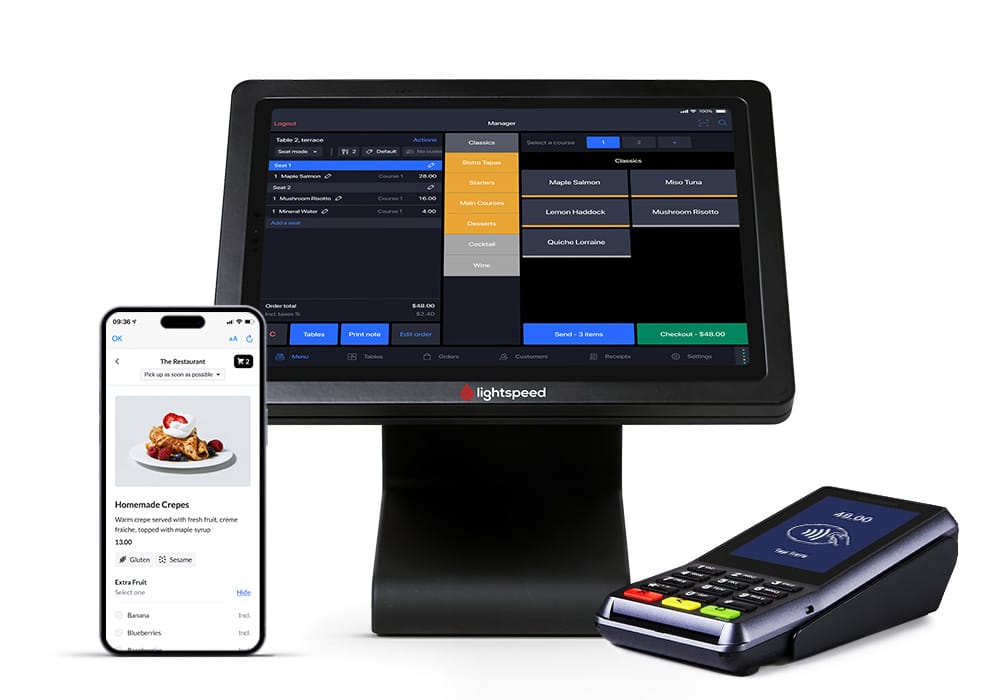
Lightspeed POS caters to a few main business verticals: retail, restaurants, and golf courses.
Retail
Lightspeed offers a POS system specifically designed for the needs of retail stores, whether you have a single location or multiple branches. Here are some examples of retail businesses that can benefit from Lightspeed POS:
- Apparel: Clothing stores, shoe stores, accessory shops
- Specialty: Bike shops, sporting goods stores, jewelry stores, home and garden stores, pet stores, electronics stores, gift stores, health and beauty stores, and toy stores
- Others: Vape shops, CBD stores, liquor stores
- Online retail stores: eCommerce businesses selling a wide range of products from fashion to electronics
- Omnichannel retailers: Businesses that operate both physical stores and online shops, providing a unified shopping experience
Restaurants
Lightspeed POS offers features tailored to the hospitality industry, such as table management, menu customization, and customer loyalty programs. The types of businesses it serves in this vertical include:
- Restaurants: Fine dining restaurants, casual dining, quick service restaurants, cafes, and bistros
- Bars and nightclubs: Pubs, cocktail bars, wine bars, and nightclubs
- Hotels and resorts: Hotel restaurants, room service operations, and resort dining facilities
- Food trucks and pop-ups: Mobile food vendors, food trucks, and temporary dining establishments
- Cafes and coffee shops: Coffee houses, tea rooms, and specialty coffee shops
- Bakeries and pastry shops: Artisan bakeries, pastry shops, and dessert cafes
Other Specialty Businesses
Apart from the main verticals, Lightspeed POS also serves a variety of specialty businesses that may have unique requirements. In this regard, Lightspeed particularly stands out with its golf course POS system.
Lightspeed POS Reviews: Pricing
Lightspeed Retail and Lightspeed Restaurant POS offer various pricing plans tailored to the needs of different businesses. Here's a general overview:
Lightspeed POS Key features
Here are some of the key features from Lightspeed POS:
Matrix Inventory System
Lightspeed handles product variants better than most POS systems in its category. Apparel shops, footwear stores can build product matrices that cover size, color, style, and other attributes, all tied to individual SKUs. Bundles, serialized items, and custom reorder points are also supported.
Built-in Wholesale Purchasing via NuORDER
Lightspeed integrates directly with NuORDER, a wholesale marketplace that lets retailers order stock from suppliers without leaving the POS back office. Product data, pricing, and quantities sync automatically once an order is placed.
Native Omnichannel Selling
Lightspeed connects in-store and online sales from a single back office. Inventory levels, customer profiles, and order histories are automatically updated across all channels. Retailers can also sell through social channels and online marketplaces without needing separate software.
Multi-Location Inventory and Reporting
Lightspeed is built for multi-store retailers. Owners can transfer stock between locations, set location-specific pricing, and view store-level performance reports from a single dashboard. The reporting suite covers sales by channel, employee productivity, and inventory turnover at a level of detail that most entry-level POS systems do not offer.
Advanced Sales Reporting and Forecasting
Lightspeed's reporting tools go well beyond basic sales summaries. Retailers can track conversion rates, customer lifetime value, product mix, and profit margins broken down by time period, location, or sales channel. Custom reports can be saved and accessed remotely.
Discover Advanced Analytics and Custom Reports
Speak with a product specialist and learn how KORONA POS can work for your business.
Schedule a DemoLightspeed POS User Reviews
Lightspeed holds solid ratings across major review platforms, but user feedback tends to split between praise for the software's capabilities and frustration with pricing and account support.
Lightspeed POS Positives
A mid-market user praises Lightspeed's checkout efficiency, straightforward inventory tracking, and the ability to manage products and pricing without relying on a third party. The onboarding experience and Help Chat support also stood out as strong points. He said "I find inventory tracking to be extremely easy, and having the ability to alter products and the POS screen in-house without needing a third party is a huge plus. It's especially important in my food management space where I can update products and pricing myself; this is vital for being cost-efficient. "

Lightspeed POS Negatives
A user highlights persistent account management issues, including difficulty reaching support, an unfulfilled discount promise following a price increase, and pressure tactics from a lending representative. The overall takeaway is that while the software functions well, post-setup account support is a notable weak point.

Lightspeed POS Pros & Cons
Like any POS system, Lightspeed has clear strengths and notable limitations. Understanding both sides helps you decide whether it's the right fit for your business before committing to a plan.
Pros of Lightspeed POS
Lightspeed earns its reputation in several key areas, particularly for retailers and restaurant operators who need a feature-rich system that can scale with their business.
User-friendly interface
Lightspeed POS is celebrated for its user-friendly interface, making it accessible to users of all technical skill levels. This ease of use ensures that businesses can quickly train their staff, minimizing downtime and enhancing overall productivity.
Efficient inventory management
The system simplifies the process of tracking stock levels, managing product variations, and handling orders. Although the API between retail and eCommerce is one-way, which can be seen as a limitation, the retail inventory system itself is robust and reliable.
Comprehensive and intuitive POS system
Lightspeed POS offers all the essential features required for effective retail management. It supports matrixes for product variations, allows for easy SKU setup, and is generally intuitive to use. These features ensure that businesses can efficiently organize their products and manage sales, contributing to smoother operations and better customer service.
High performance and data management
Lightspeed POS's key strength is its performance, as it operates entirely online and delivers fast processing speeds. Additionally, the system facilitates easy data management, allowing users to import and export data seamlessly between Lightspeed and Excel.
Cons of Lightspeed POS
Despite its strengths, Lightspeed has drawn consistent criticism in a few areas that are worth weighing carefully, especially for smaller businesses or those operating on tighter budgets.
Difficult customer service experience
Many users report that their experience with Lightspeed POS has been overwhelmingly negative right from the start. The lack of effective support and unresponsive onboarding personnel has compounded the problem, creating a challenging scenario where businesses are left without a functional POS solution despite being under contract.
The threat of hefty fines for contract termination makes this problem even more alarming, essentially trapping customers in an unsatisfactory arrangement.
Risky chargeback policies
Lightspeed POS's handling of chargebacks poses a significant risk to businesses. A critical flaw is that the system allows debit card chargebacks to proceed without requiring the return of the merchandise.
Misleading sales tactics
Lightspeed POS customer service has been widely criticized as subpar, with customers reporting unresponsive and unhelpful support teams. Furthermore, accessing meaningful reports, such as inventory valuations, incurs additional costs. These additional costs can make Lightspeed a more expensive choice compared to Square or KORONA POS.
KORONA POS: An Alternative to Lightspeed POS
If you've been shopping around for a Lightspeed alternative, KORONA POS is worth a serious look. Built by COMBASE USA, KORONA is a cloud-based point of sale system designed for specialty retail, quick-service restaurants, and ticketing businesses. It has earned a strong reputation for flexible pricing, deep inventory tools, and an open approach to payment processing that Lightspeed simply doesn't offer.
Key Features
KORONA POS separates itself from Lightspeed in several meaningful ways. Here's where it stands out:
- Payment processor freedom. Unlike Lightspeed, which pushes merchants toward its own payment processing, KORONA is fully processor-agnostic. You can work with virtually any third-party payment processor and negotiate your own rates. For high-volume retailers, that kind of flexibility with payment processing can translate into significant monthly savings.
- Advanced inventory management. KORONA's inventory tools go well beyond what Lightspeed offers at comparable price points. The Retail plan includes ABC inventory grading, automatic reorder points, vendor management, barcode automation, and multi-location stock tracking. For high-SKU businesses like liquor stores or convenience stores, these features are built into the core platform rather than locked behind expensive add-ons.
- No contracts, no cancellation penalties. KORONA runs month-to-month. There are no long-term commitments and no fees for leaving. Lightspeed has historically required annual contracts, which can be a real problem for businesses whose needs change.
- Unlimited free trial. KORONA offers an unlimited free trial with no credit card required. You can take the full system for a spin before spending a single dollar.
- Deep niche retail support. KORONA is purpose-built for specialty retail categories. It has dedicated solutions for wineries, dispensaries, smoke shops, and CBD retailers. These come with industry-specific features like age verification, compliance tools, and tasting note fields.
- Self-checkout capabilities. For retailers looking to cut labor costs and speed up checkout, KORONA supports self-checkout kiosk setups.
- Strong reporting and analytics. KORONA generates detailed reports on conversion rates, foot traffic, KPIs, tax breakdowns, and product-level performance. Multi-location owners can compare store data side by side without needing additional software. You can learn more about the reporting and analytics capabilities on their features page.
- Multi-store management built in. KORONA handles franchise and multi-location operations natively, including commission and royalty calculations. For growing retailers, the best multi-store POS systems need centralized control, and KORONA delivers that without requiring enterprise-level pricing.
Pricing
KORONA POS uses a subscription-based pricing model starting at $59 per month per terminal. There are no surcharges, hidden fees, contracts, or cancellation penalties. All plans include unlimited 24/7 customer support by phone, chat, and email, as well as unlimited product demos and training sessions.
Here's a quick breakdown of the plans:
- KORONA Core: $59/month per terminal. Covers basic POS functionality, sales management, inventory tracking, and customer profiles.
- KORONA Retail: $79/month per terminal. Adds employee permissions, loyalty programs, advanced reporting, ABC inventory grading, and automated reorder points.
- KORONA POS Plus: $99/month. It offers more in-depth features, assortment cleanup, key performance reports, slow movers, and top sellers.
Where KORONA POS Shines
KORONA is not a one-size-fits-all system. It's built for specific types of businesses, and in those niches, it genuinely outperforms Lightspeed:
- Specialty and age-restricted retail. Liquor stores, vape shops, smoke shops, and cannabis dispensaries benefit from KORONA's compliance features, age verification tools, and flexible tax handling. Lightspeed lacks many of these out of the box.
- High-volume inventory environments. Businesses with large product catalogs appreciate KORONA's automated margin enforcement, bulk price adjustments, and vendor management tools. The automatic retail price adjustment feature allows retailers to update product prices based on changes in costs automatically, applying consistent margin-based adjustments across multiple items without manual edits.
- Multi-location retailers. KORONA handles centralized inventory, staff permissions, and performance comparisons across locations without requiring a premium-tier plan.
- Businesses frustrated by processor lock-in. If you've been stuck paying high processing rates with Lightspeed Payments, KORONA lets you bring your own processor and renegotiate your rates without switching software.
- Salons and service retail. KORONA has also been recognized as one of the best POS options for salons, particularly for those that also manage product inventory alongside service bookings.
Customer Reviews
Across Capterra, G2, and SoftwareAdvice, KORONA POS earns consistently strong ratings. Here's what real users are saying:

On the downside, some users mention a learning curve, particularly around German-influenced terminology in the interface. A few reviewers also note that advanced customization can require support team assistance during setup. That said, the onboarding and support processes are standout strengths, with users reporting they can reach someone on the phone within a minute.
Who KORONA POS Is Best For
KORONA POS is a strong fit for the following types of businesses:
- Specialty retailers in age-restricted categories like liquor, cannabis, tobacco, and CBD who need compliance tools and flexible payment options
- Convenience store owners who need fast transaction speeds, strong inventory automation, and multi-location visibility
- Wineries and tasting rooms that need membership management, tasting note tracking, and event ticketing in a single platform
- Multi-location retailers looking for centralized reporting and inventory control without paying enterprise-level pricing
- Any business switching from Lightspeed due to rising subscription costs or frustration with processor lock-in
- Retailers who want a free trial before committing, since KORONA's unlimited trial is one of the most generous in the industry
KORONA POS is not the best choice for businesses that rely heavily on eCommerce integrations or need a polished, design-forward interface. But for specialty retailers who prioritize inventory control, cost transparency, and processing freedom, it's one of the most capable systems available at its price point.
Lightspeed POS Review: Conclusion
Lightspeed POS is robust and feature-rich POS software that meets the needs of retail stores and restaurants. Its user-friendly interface, robust inventory management, and support for omnichannel selling are major advantages. However, users have reported issues like poor customer service, risky chargeback policies, and misleading sales tactics that should not be overlooked.
Ultimately, whether Lightspeed POS is the right fit depends on your specific business requirements and priorities. Alternatives such as KORONA POS may be better suited to certain high-risk retail verticals.
As with any major software investment, it's crucial to thoroughly evaluate your options, read reviews from real users, and ensure the chosen solution aligns with your operational needs and budget. With careful consideration, you can find a POS system that optimizes efficiency and profitability for your business. Click below to try KORONA POS or get a demo if you want to learn more.
Speak with a product specialist and learn how KORONA POS can power your business.
Schedule a DemoFrequently Asked Questions
1. Is Lightspeed a good POS?
Lightspeed is considered a good POS system by many businesses and reviewers. It is praised for its comprehensive feature set, user-friendly interface, and flexibility to suit various types of businesses, including retail stores and restaurants. Lightspeed does, however, have many negative user reviews across third-party software review websites.
2. How much does Lightspeed POS charge per transaction?
Lightspeed POS typically charges a payment processing fee of around 2.6% + $0.10 per transaction for card-present transactions and 2.9% + $0.30 for card-not-present transactions. However, these rates can vary based on the specific agreement and volume of transactions. It's best to contact Lightspeed directly for precise details tailored to your business.
3. Is Lightspeed payment legit?
Yes, Lightspeed Payments is a legitimate and secure payment processing solution integrated with the Lightspeed POS system. It offers reliable and compliant payment processing services, ensuring transactions are handled safely, though the fees are slightly higher than industry averages.
4. Does Lightspeed POS include hardware in its plans?
Lightspeed POS plans typically do not include hardware by default. Hardware, such as iPads, receipt printers, barcode scanners, and cash drawers, must be purchased separately. Lightspeed does offer hardware bundles and leasing options to accommodate various business needs.
5. Does Lightspeed POS require a contract?
Lightspeed POS offers both monthly and annual subscription plans. While the monthly plans do not require long-term contracts, opting for an annual plan can provide cost savings. It's important to review the terms and conditions of the subscription plan to understand any commitments or cancellation policies.
6. Is Lightspeed better than Shopify?
Whether Lightspeed is better than Shopify depends on your business's specific needs. Lightspeed is highly regarded for its robust POS features tailored to the retail and restaurant industries, while Shopify is renowned for its eCommerce capabilities and integration with its online store platform.